I have no problems with being compared to sort of a mechanic. I fix things, and if I can’t fix things, chances are they are broken at the Engineering level, so I have to go back to the people who create the parts. Despite usually being outside the Scope of Support, I like to break the rules, and sometimes break the product, and have some fun with XSL projects/customizations. Ideally, my job would be represented by this image:

Archive for the ‘Uncategorized’ Category
Localization Tidbits
This is one of the more complicated aspects of support for ePublisher as it in encompasses every part of the process: Input (which version of FrameMaker are you running), Generation (what language and what operating system are you using) and Output (does the format have the proper support of Unicode, for example). David Shaked, of AlmondWeb, has a great wiki article here on what you should do for localizing information through the process of input -> output. Also, sense we primarily have web-based outputs, we have to take into account the browser that you are using. Firefox can handle different languages and wingding fonts then Internet Explorer. This can be a challenge, but if you have access to VM’s and the language packs, it will make troubleshooting a little bit easier.
Fun with Format Traits Info!
Here at WebWorks, we would love to help everyone get ePublisher to do everything possible and make all of your wildest dreams come true. Most of the times we can at least come up with a compromise or direct users into a forum where they can find the information or experiment via the Wiki, or one of our many events such as Study Hall or Power Hour. Sometimes, however, with the magic of XSL and our Format Trait Info you can do amazing things. Today’s example comes from a desire to have certain HTML elements emitted with paragraphs via our interface. By the way, this is an extension of this article except that you do not need to take into account the Page.asp modifications as we are just adding some HTML given a certain paragraph style. (more…)
Where did my FrameMaker items go?
Something that you may notice when you are trying to edit pages, specifically when you are trying to delete pages is that this option is not available:
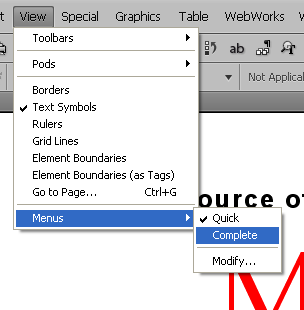
This is a symptom of not using the complete menu options in FrameMaker. Go to View -> Menus and select the option for complete to see all of your options reappear:
From there you should be able to see the correct options.