
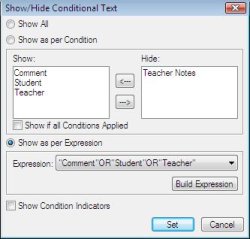
Figure: FrameMaker 8’s Show Conditional Text as per Expression
Currently, we are working on updating ePublisher to run on Windows
Vista. Also I am working on updating ePublisher’s FrameMaker Tool
Adapter to support FrameMaker 8. One of the more challenging
aspects of this latter task is adding support for FrameMaker 8’s new
“conditional expression” feature. This feature allows the end user
to define a logical expression which should be used when applying
visibility settings to conditional segments of a FrameMaker document.
On the FrameMaker side, it seems that retrieving the information
from the new FDK is relatively trivial. The more interesting
challenge may be how to present this new paradigm to ePublisher
users. At first we decided to wrap the old mechanism in a radio
button region, and add the new option to a new radio button section.
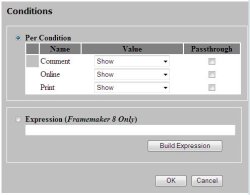
Figure: HTML Mock-up of Radio Button Approach
Initial efforts to design this approach have fleshed out an
important shortcoming in the current “unified” interface that
ePublisher presents for defining condition visibility. Specifically,
different source formats have different ideas of what “conditions”
are and how they are implemented. DITA provides a “tag-like”
approach which allows filtering for purposes other than visibility.
If your input is Word or a version of FrameMaker below 7.x, you have
no use for an expression option.
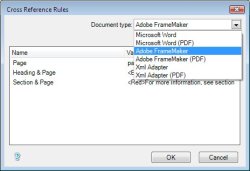
Figure: ePublisher’s Cross Reference Rules Dialog
This revelation is causing us to pursue an alternative approach. The
idea is to move Conditions out of the hybrid Conditions/Variables
dialog, altogether, and model a new Conditions dialog, after the
existing Cross Reference Rules dialog. As with Cross Reference Rules,
this approach would allow us to display a Conditions dialog
appropriate for each input format. No mock-up yet, but stay tuned.

Can you please tell me when Frame 8 will be compatible with your product?
Thank you!
Ellen Faden
(415) 342-1552
ePublisher has worked with FrameMaker 8 since 2008.1.