Archive for the ‘tips-n-tricks’ Category

ePublisher 2012.1: Style Designer gets turbo-charged!

Posted on: May 10th, 2012 No Comments

Now you can more quickly configure all your styles within the Style Designer without having to generate the actual output.
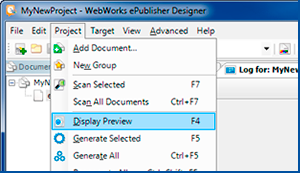
ePublisher Style Designer

When you select the “Display Preview” menu item in ePublisher Designer, it now opens the Style Designer alongside the Preview tab. The Preview tab will show an approximation of how your content will look after it has been generated with ePublisher. While examining the content in the Preview tab, you can select paragraphs or tables. When selected, the Style Designer will highlight the corresponding style, saving you the hassle of locating the associated style. From there, you can quickly make modifications to style properties.

See for yourself how ePublisher Designer quickly configures your paragraph styles with the Display Preview capability.
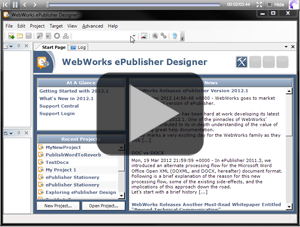
ePublisher Style Designer Demo

This brief video displays the power and simplicity of ePublisher Designer’s style designer with new preview mode capability. Simply load your project, generate a preview, and begin configuring all your styles. Editable paragraph properties, such as margin settings, borders, backgrounds, fonts, and so much more, are now easily accessible and directly in front of you, allowing you to edit their values in real time, alongside your preview display.
Save Time with TOC Auto-Detect Feature

Posted on: January 26th, 2012 No Comments

Save time when creating your ePublisher stationery by using the new table of contents auto-detect feature.

ePublisher Pro

In all versions of ePublisher prior to 2011.3, stationery designers were required to specify the level for each paragraph style that was going to be displayed in the generated table of contents (TOC). While this may seem like a routine configuration, it is somewhat redundant, as it is very likely that the original source document author has already specified these levels. Now, ePublisher can simply detect those levels automatically.

Users with existing projects and stationeries that have already been set up don’t have to do anything. Their TOC levels are already manually set. If you start/create new stationeries or Pro projects, this feature will immediately begin working for you. However, if you decide that the levels specified in your source documents are not what you want, you can still use ePublisher Pro to set the level to a specific value, thus bypassing the auto-detect capability.

Another benefit of this new feature is that it makes ePublisher Pro easier to learn for new users because most of your conversions will now generate a complete and fully functional online help deliverable without users having to learn much about ePublisher Pro’s style designer.


ePublisher Pro

For Example:

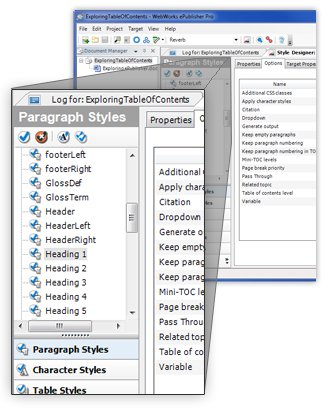
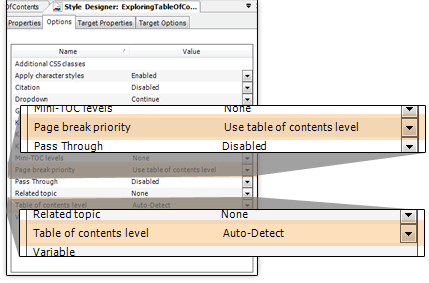
“Page Break Priority” allows you to split your document into separate pages by setting auto-detect for your table of contents level
(See Below).

Here you set your table of contents level to “Auto-Detect.” Once properly configured, ePublisher will now automatically detect the appropriate level from the source document.


ePublisher Pro

Output Type:

Once all settings are properly configured, ePublisher will automatically detect your native table of contents level inherent to your source document and render your output into the chosen output format type (Seen here in WebWorks Reverb).

WebWorks Tips and Tricks: Transform Static Content into Engaging Web Pages

Posted on: July 1st, 2011 No Comments

Click the links below to view WebWorks’ Latest Tips and Tricks.  Learn how to fully utilize WebWorks Reverb and its Disqus integration to turn your online help or published content into an engaging and interactive web page that will make your end users swoon.

STEP 1: Add WebWorks Reverb to your ePublisher Pro Project >>

STEP 2: Enable Disqus in your Format Settings >>

TIPS & TRICKS ARCHIVE #4 – ePublisher & 508 Compliance

Posted on: October 7th, 2010

In 1998 The US Government approved a new law that stated that all government agencies must give disabled employees and members of the public access to information that is comparable to the access available to others. This directive is known as the Section 508 Law, and in the intervening years has been adopted not only by government, but by many industries as well.

Delivering Section 508 compliant information is becoming an essential part of doing business online.

You can use ePublisher to help you make sure that you produce online content that conforms to Section 508, as well as the W3C Web Content Accessibility Guidelines 1.0 (WCAG), and the Americans with Disabilities Act (ADA).

To generate accessible content, typically you provide the following items in your online deliverables:

(more…)

TIPS & TRICKS ARCHIVE #3 – ePublisher Language Support

Posted on: October 6th, 2010

Did you know that ePublisher had some of the most flexible and customizable language handling capabilities of any publishing platform?

As well as ePublishers own extensible language support, the fact that the product is based on Microsoft’s .NET runtime means that we can also support localized sorting for any of the languages it supports.

Out of the box ePublisher supports the following languages:

(more…)

TIPS & TRICKS ARCHIVE #2 – ePublisher Reports

Posted on: September 27th, 2010

ePublisher is not just about converting your content from one format to another. While automating the publishing process by separating it from the authoring process is one of our key objectives, another is helping you develop the most efficient high quality output possible. To do this we generate reports on what ePublisher is doing and the status of your documentation at every stage of the production pipeline.

Using these reports you can easily find, and correct errors, as well as continue to fine tune your process to ensure that you deliver the best content in the most efficient manner possible.

(more…)